Microsoft Robotics Studio and LEGO Robots
Chairman Gates said 20 years ago: “A PC on every desk and in every home, running Windows.” After 20 years of revolutionary struggle, looking back, it’s not fully realized but close.
Last year, Chairman Gates gave new direction in a Scientific American interview: “Twenty years from now, every home will have a robot, and every robot will run Windows.” The revolutionary masses received the supreme指示 with joy and threw themselves into the new revolutionary cause.
Answering the Chairman’s call, the Microsoft Party branch quickly formed the Robotics Revolutionary Committee. Holding high the banner of “Three Represents” for robots, guided by the Scientific Robot Concept, after nearly a year of fiery revolutionary struggle, they grandly launched Microsoft Robotics Studio 1.0, laying a solid foundation for a robot in every home.
Pure entertainment above. Today we’re talking about Robotics Studio and the LEGO robot platform.
First, LEGO robots:
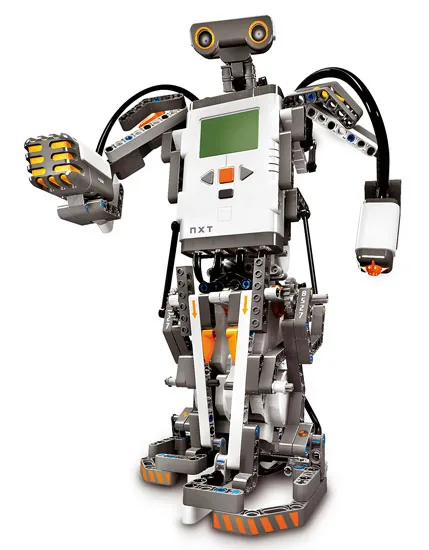
Figure: LEGO NXT
Robots today are mainly specialized or通用. Specialized ones like assembly line robots won’t enter ordinary homes. What might enter homes are通用 robots — like ones that clean your floors.
LEGO, formerly a children’s toy company, moved into robotics. The first version was RCX, now NXT. RCX had an 8-bit processor with limited capabilities. NXT greatly enhances hardware:
Main processor: 32-bit ARM7 Co-processor: 8-bit AVR Bluetooth wireless communication Input ports: 4 six-wire digital interfaces Output ports: 3 six-wire digital interfaces
LEGO provides blocks, a control computer, and sensors. The robot in the picture was assembled from blocks — armed to the teeth. Left hand: audio sensor, right hand: pressure sensor, control system in the middle, head: ultrasonic sensor, two legs: two motors, a photosensitive sensor somewhere. Many other shapes are possible. Its belly is the key control module.
With Bluetooth, NXT can exchange data with Bluetooth devices. Our current simple project: connect it to a Smartphone via Bluetooth. The Smartphone receives sensor data from the robot and sends commands. Complex multimedia processing (image recognition, speech recognition, TTS) happens on the Smartphone, while the robot handles mechanical actions and sensor data collection.
Many envisioned features: simple human-machine dialogue, image recognition to pick up trash. First step: make the robot run 24x7. Power is the first problem. NXT is rechargeable, runs about 8 hours per charge. We’re working on: robot patrols the room, uses the Smartphone’s camera to analyze wall outlet positions, then autonomously navigates to the outlet, plugs itself in, charges, unplugs when full, and continues patrolling. Works pretty well so far. Combined with TTS and speech recognition. Future plan: robot plugs itself into a computer to update its brain. After that, people will be amazed. We’ll make a video for Microsoft’s website.
As a programmer, you might be excited about writing robot code. Many options: C, Java, or LEGO’s G language (like VB, drag-and-drop, no coding).
Our current system is embedded but doesn’t use Robotics Studio, though we借鉴 some MSRS ideas. Finally, what is Robotics Studio?
Companies providing robot platforms like LEGO aren’t unique. Microsoft’s work is to wrap these platforms with a unified layer providing a consistent interface. ASCII architecture diagram:
| MS VPL | —————– —————– | CCR / DSS | —————– —————– | Unified Layer | —————– —————– | LEGO | iRobot | … | —————–
Bottom: different companies’ platforms (LEGO, iRobot, etc.). Above: Microsoft’s unified封装 — essentially MSRS drivers for different hardware. Above that: MSRS’s real content. Microsoft, being a software company, built CCR and DSS — pure .NET platforms unrelated to robots: services for async, concurrency, fault tolerance, etc. This layer is complex and scares beginners. Top: Microsoft’s VPL language, similar to LEGO’s G language but running on many robot platforms, showing Microsoft’s resolve to unify the robot platform. Whatever robot you use, you can program with MSRS and C#.