The Fight Against Gmail Ads
I’ve always thought Gmail was quite clean. Sure, there are ads on the right side of emails, but tolerable. To support Gmail’s long-term development, I even occasionally clicked on the ads.
This morning when I logged into Gmail, I found a new ad bar below my emails, as shown:
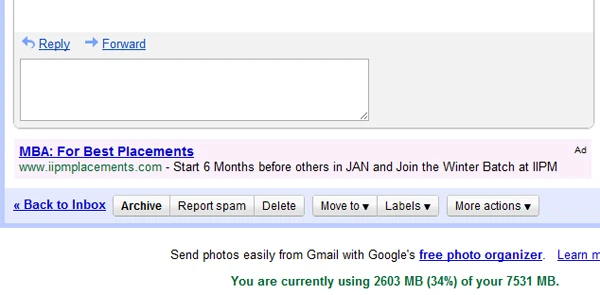
Suddenly felt like my emails were surrounded by ads. Can’t avoid them. The more I looked, the more uncomfortable I felt. Then I remembered reading about Chrome extensions that inject JavaScript into websites. Why not do it myself and remove Gmail ads? So I got to work. Started with the Hello World tutorial and wrote a manifest.json:
{ “content_scripts”: [ { “exclude_globs”: [ ], “include_globs”: [ “http://mail.google.com/”, “https://mail.google.com/”, “http://.mail.google.com/”, “https://.mail.google.com/” ], “js”: [ “script.js” ], “matches”: [ “http:///”, “https:///” ] } ],
“description”: “Remove gmail Ads on right and bottom”,
“name”: “Gmail Ads Remover”,
“version”: “1.0”,
“browser_action”: { “default_icon”: “icon.png”, “popup”: “popup.html” } }
Then wrote the JavaScript. Only to discover that Gmail’s HTML is incredibly complex. Google engineers are no slouches. Luckily, Chrome’s right-click -> Inspect Element is very handy. After tremendous effort, I managed to remove the right-side ads. (Won’t post the code, too embarrassing.)
Then I thought: surely I’m not the only one who can’t stand Gmail ads. Someone must have done this before. “Don’t reinvent the wheel” is basic software engineering. After searching, I finally found a plugin called “Adblock Plus for Google Chrome.” Installed it, and both the right and bottom ads in Gmail disappeared. Much cleaner. Recommended. Won’t post the URL — search for it yourself. It’s not exactly legal. If everyone installs this, Google might get angry and block it, or even block your account like Microsoft did with Xbox Live!